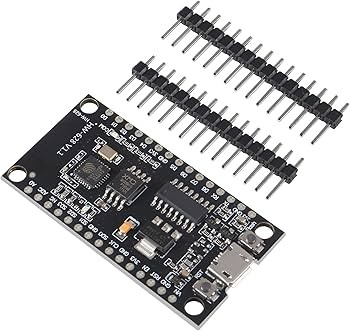
The NodeMCU CH340 ESP8266 Wi-Fi Development Board is a compact microcontroller platform for IoT, wireless monitoring, smart-home automation and DIY electronics. It combines an ESP8266 Wi-Fi system-on-chip with a CH340 USB-to-serial interface, allowing you to program and power the board through its Micro USB connection.
Key Features
Built-in Wi-Fi
Connect compatible projects to 2.4GHz Wi-Fi networks for wireless control, monitoring and data communication.
ESP8266 Processor
Uses the ESP8266 32-bit Xtensa LX106 microcontroller for connected embedded applications.
CH340 USB Interface
Onboard USB-to-serial conversion supports programming, serial monitoring and USB power through the Micro USB port.
Arduino IDE & Lua
Develop with the ESP8266 Arduino core or compatible NodeMCU Lua firmware.
GPIO Connectivity
Connect compatible sensors, switches, displays and driver circuits using the board’s labelled I/O pins.
Compact IoT Platform
A practical controller for smart-home prototypes, wireless sensors and network-enabled DIY projects.
Technical Specifications
| Board Type |
NodeMCU ESP8266 development board |
| Microcontroller |
ESP8266, Tensilica Xtensa LX106 32-bit |
| USB-to-Serial |
CH340 |
| Wi-Fi |
2.4GHz IEEE 802.11 b/g/n |
| Logic Voltage |
3.3V |
| USB Power |
5V via Micro USB; onboard regulator supplies 3.3V to the ESP8266 |
| CPU Frequency |
Typically 80MHz; configurable up to 160MHz |
| Flash Memory |
Listing specifies 32Mbit (4MB); verify fitted flash on the supplied board |
| Analogue Input |
1 ADC input (A0); allowable voltage depends on the board’s input divider design |
| Digital I/O |
Multiple GPIO pins; available pins and functions depend on board revision |
| USB Connector |
Micro USB (as listed) |
| Programming |
Arduino IDE / NodeMCU Lua firmware / compatible ESP8266 tools |
Compatible Devices and Development Tools
- Arduino IDE with the ESP8266 board package
- NodeMCU Lua firmware and compatible development tools
- 2.4GHz Wi-Fi routers and access points
- 3.3V-compatible digital sensors, switches and displays
- External relay, motor and actuator driver modules with suitable power supplies
- Compatible I2C, SPI and UART peripherals, subject to GPIO mapping and pin availability
Applications
- Wi-Fi-enabled home automation and smart switches
- Wireless temperature, humidity and environmental monitoring
- IoT dashboards, web servers and remote device control
- Wireless sensor nodes and data logging prototypes
- Internet-connected robotics and DIY electronics
Connection and Setup Guide
- Connect the board to your computer using a Micro USB data cable.
- Install the CH340 driver if your operating system does not detect the serial port automatically.
- In Arduino IDE, install the ESP8266 board package and select the matching NodeMCU ESP8266 board option.
- Select the detected COM/serial port and upload a basic test sketch.
- For Wi-Fi projects, configure your 2.4GHz network credentials in the sketch and test the connection.
- Connect external modules only after checking their voltage requirements and the board pinout.
Important Before Buying
- ESP8266 GPIO operates at 3.3V and is not 5V tolerant. Use a suitable logic-level converter with 5V signal devices.
- Use 5V through the Micro USB port for normal board powering. Do not connect 5V directly to the 3V3 pin.
- The raw ESP8266 ADC input has a lower voltage limit than some NodeMCU board A0 inputs. Check the exact board’s divider and A0 rating before applying an analogue signal.
- Flash is described as 32Mbit in the product details, equivalent to 4MB. The actual fitted flash chip should be checked if your project needs a specific capacity.
- Wi-Fi transmission can cause current peaks. Use a stable supply and do not power high-current motors or relays directly from the board.
- GPIO boot-strapping pins have special startup requirements. Avoid forcing GPIO0, GPIO2 or GPIO15 into the wrong state during boot.
- Header soldering status and USB cable inclusion are not confirmed in the product information.
Frequently Asked Questions
What is the NodeMCU ESP8266 board used for?
It is used for IoT prototypes, Wi-Fi automation, wireless sensors, web servers, remote monitoring and other connected electronics projects.
Does this board have built-in Wi-Fi?
Yes. The ESP8266 provides 2.4GHz Wi-Fi connectivity and supports common station and access-point networking modes.
What is the CH340 chip for?
The CH340 acts as a USB-to-serial interface, allowing a computer to communicate with the ESP8266 for programming and serial monitoring.
Can I program it using Arduino IDE?
Yes. Install the ESP8266 board package in Arduino IDE, select the matching NodeMCU board and choose the correct serial port.
Is the board compatible with 5V sensors?
Do not connect 5V signals directly to ESP8266 GPIO. Use a suitable level shifter or interface circuit unless the peripheral’s output is confirmed to be 3.3V safe.
How much flash memory does it have?
The product details specify 32Mbit, which equals 4MB. Confirm the fitted flash chip if your application depends on an exact capacity.
Can I power it through Micro USB?
Yes. The listed board uses a 5V Micro USB input and an onboard regulator to provide the 3.3V supply required by the ESP8266.
Does the package include a USB cable or pin headers?
The product information does not confirm cable inclusion or whether headers are pre-soldered. Please check the supplied package details if these accessories are essential.
Why Buy from PcGuy Computers?
- Local ordering in Pakistan
- Product information focused on practical compatibility
- Support for electronics and IoT project selection
- Convenient online ordering
Buy NodeMCU CH340 ESP8266 Wi-Fi Development Board in Pakistan
Order the NodeMCU CH340 ESP8266 Wi-Fi Development Board from PcGuy Computers for IoT, smart-home automation and wireless electronics projects. Check GPIO voltage limits, analogue input ratings and the exact board revision before connecting external components.


 Pick up from PcGuy Computers Store


 Pick up from PcGuy Computers Store
 AusPost Standard
 AusPost Express
 Arduino Modules & Sensors
 Battery Compartments
 Component Cases
 Electronics Kits
 Microcontroller Boards
 Project Enclosures
 Shields & Hats
 Tablets
 Laptops
 Laptop Accessories
 CPU (Processor)
 CPU Coolers
 GPU (Graphics)
 HDD/ SSD (Storage)
 MOBO (Motherboard)
 PSU (Power Supply)
 RAM (Memory)
 Keyboard & Mouse Combo
 Keyboards
 Printers
 USB
Reviews
There are no reviews yet.