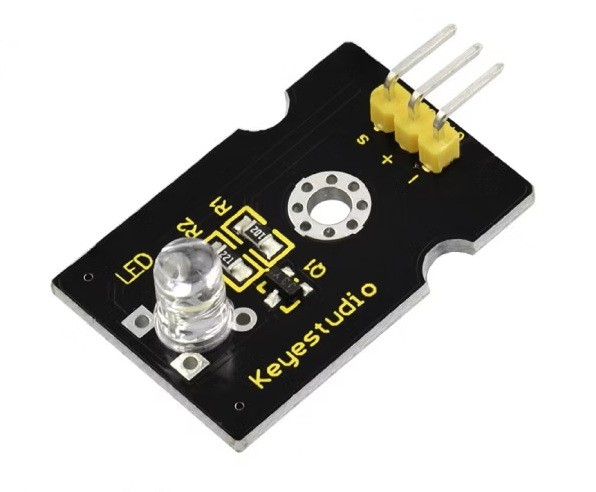
The Keyestudio Digital Piranha White LED Module is a compact white-light output module for Arduino and compatible electronics projects. It uses a digital control signal to switch the LED on and off, making it useful for status indicators, warning lights, simple illumination experiments, robotics and interactive STEM builds.
Key Features
Bright White LED
Produces white light for visible status and indication projects.
Digital On/Off Control
Switch the LED using a HIGH or LOW signal from a compatible controller.
3.3V–5V Supply
The standard three-pin Keyestudio white LED module supports a 3.3V to 5V supply.
Simple Three-Pin Interface
Signal, VCC and GND connections make prototyping straightforward.
Arduino Projects
Use it for blinking indicators, alerts and sensor-triggered light responses.
STEM Learning
A simple way to learn digital outputs and basic microcontroller programming.
Technical Specifications
| Brand |
Keyestudio |
| Product Type |
Digital White LED / Piranha LED Module |
| Reference Model |
KS0016 (standard 3-pin white LED version; verify board marking) |
| LED Colour |
White |
| Control Interface |
Digital |
| Working Voltage |
DC 3.3V–5V |
| Pin Configuration |
-: GND; +: VCC; S: Signal |
| Pin Pitch |
2.54mm |
| Dimensions |
34 × 20 × 11.5mm (KS0016 reference) |
| Weight |
Approx. 2.7g (KS0016 reference) |
Applications and Project Ideas
- Status indicator: Show whether a device or process is active.
- Warning light: Turn on a white LED when a sensor detects a selected condition.
- Robotics: Add a simple light output to a robot or prototype.
- Interactive projects: Combine the LED with buttons, tilt sensors or other input modules.
- STEM experiments: Learn digital output control and basic circuit connections.
Wiring and Setup
- Connect + to a supported 3.3V or 5V supply.
- Connect – to GND.
- Connect S to a compatible digital output pin, such as Arduino D3.
- Set the selected pin as OUTPUT in your sketch, then use digitalWrite() to switch the LED.
Example Arduino blink code:
const int ledPin = 3;

void setup() {
  pinMode(ledPin, OUTPUT);
}

void loop() {
  digitalWrite(ledPin, HIGH);
  delay(1000);
  digitalWrite(ledPin, LOW);
  delay(1000);
}
Important Buying Notes
Keyestudio offers different white LED module styles, including standard three-pin boards and EASY Plug versions with an RJ11 socket. Connector layouts and electrical specifications can differ. The specifications above refer to the standard three-pin KS0016-style module; please confirm the printed model and connector on the supplied item if you require a particular version. Use only the stated supply range and do not connect the LED directly to a power source outside its specified operating range.
Frequently Asked Questions
What does the Keyestudio Digital Piranha White LED Module do?
It provides a white LED light output that a compatible microcontroller can switch on and off using a digital signal.
What voltage does the standard module support?
The standard KS0016 three-pin white LED module is specified for DC 3.3V to 5V operation.
How many pins does it have?
The standard module has three pins: S for signal, + for VCC and – for GND. Check your board because EASY Plug variants use a different connector.
Can I use it with Arduino Uno?
Yes. Connect the signal pin to a digital output, VCC to a supported supply and GND to ground. Use pinMode() and digitalWrite() in your Arduino sketch.
Can I make the LED blink?
Yes. Alternate the digital output between HIGH and LOW with a delay to create a blinking effect.
Can I adjust its brightness?
The standard documentation describes digital on/off control. Do not assume brightness control unless the exact module revision supports PWM on its signal input.
Is this an RGB LED?
No. This is a white LED module, not a multi-colour RGB module.
Is the EASY Plug version identical?
No. EASY Plug versions use an RJ11-style socket and may have different voltage and connector requirements. Confirm the exact version before connecting it to a controller.
Why Buy from PcGuy Computers?
PcGuy Computers provides product information and assistance to help customers choose suitable electronics and STEM development modules. Confirm the exact module revision, package contents and applicable warranty terms with the store before ordering.
Keyestudio Digital Piranha White LED Module – Summary
The Keyestudio Digital Piranha White LED Module is a simple white-light output for Arduino and compatible electronics projects. Its digital interface supports straightforward on/off control for indicators, warning lights, robotics and STEM experiments. Check the board revision and connector type before wiring.

 Pick up from PcGuy Computers Store


 Pick up from PcGuy Computers Store
 AusPost Standard
 AusPost Express


 Arduino Modules & Sensors
 Battery Compartments
 Component Cases
 Electronics Kits
 Microcontroller Boards
 Project Enclosures
 Shields & Hats
 Tablets
 Laptops
 Laptop Accessories
 CPU (Processor)
 CPU Coolers
 GPU (Graphics)
 HDD/ SSD (Storage)
 MOBO (Motherboard)
 PSU (Power Supply)
 RAM (Memory)
 Keyboard & Mouse Combo
 Keyboards
 Printers
 USB
Reviews
There are no reviews yet.