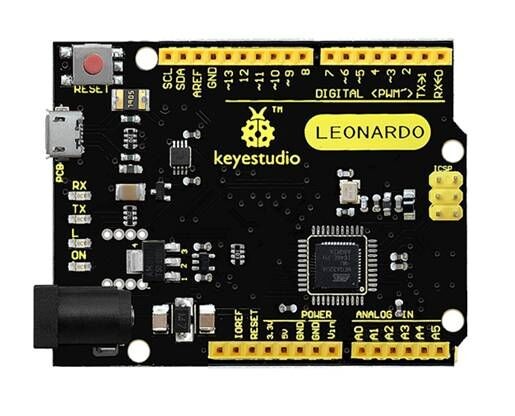
The Keyestudio KS0248 Leonardo R3 Development Board is an Arduino-compatible controller built around the ATmega32U4 microcontroller. Its native USB capability supports direct computer communication and appropriately programmed USB HID projects, including custom keyboard and mouse interfaces. With 20 digital I/O pins, 12 analogue inputs, 7 PWM outputs and a 16MHz clock, it is suited to electronics prototyping, robotics, automation and interactive projects.
Key Features
ATmega32U4 Controller
8-bit AVR microcontroller with integrated native USB functionality and a 16MHz clock.
Native USB & HID
With suitable firmware, the board can act as a USB keyboard, mouse or serial device.
20 Digital I/O
Connect buttons, LEDs, sensors and compatible expansion hardware through digital input/output pins.
12 Analogue Inputs
Read analogue sensors, potentiometers, joysticks and other variable-voltage signals using 10-bit ADC.
7 PWM Outputs
Generate PWM signals for compatible control inputs and LED brightness applications.
Micro USB & ICSP
Use Micro USB for programming and communication, with an ICSP header for SPI and in-circuit programming.
Native USB for Keyboard and Mouse Projects
The ATmega32U4 includes USB functionality within the microcontroller, so normal USB communication does not require a separate USB-to-serial controller. With suitable Arduino code, the KS0248 can present itself to a computer as a Human Interface Device (HID).
- Custom macro keypad and shortcut controller
- Push-button computer or presentation controls
- DIY game controller and button box
- Accessibility input interface
- Interactive electronics and test-control projects
HID behaviour depends on the firmware programmed onto the board and the connected computer.
Digital I/O, Analogue Inputs and PWM
The board provides 20 digital input/output pins, 12 analogue input channels and 7 PWM-capable outputs. Its analogue inputs use 10-bit conversion, providing 1024 possible values across the configured reference range. The PWM pins listed for this board are D3, D5, D6, D9, D10, D11 and D13.
Use these connections with compatible switches, sensors, LEDs, joysticks and expansion modules. Motors, pumps, solenoids, heaters and other substantial loads require appropriately rated external driver circuitry and power supplies; do not power them directly from GPIO pins.
USB, Power and Programming
The KS0248 uses a Micro USB connector for programming, computer communication and USB power. The supplied package listing includes a 1 metre Micro USB cable. For standalone operation, Keyestudio specifies a recommended external input range of 7–12V DC through the DC power jack or suitable VIN and GND connections. Check polarity and the requirements of connected hardware before applying external power.
The board operates at 5V logic. Check voltage tolerance before connecting 3.3V sensors or modules directly; connector compatibility does not guarantee electrical compatibility.
Leonardo Pin and Communication Notes
- Serial: Refers to the native USB CDC serial connection to the computer.
- Serial1: Accesses the hardware UART on D0 (RX) and D1 (TX).
- I2C / TWI: D2 is SDA and D3 is SCL on this Leonardo architecture.
- SPI: Available through the 6-pin ICSP header, rather than the UNO-style D11, D12 and D13 arrangement.
- ICSP: Can be used for in-circuit serial programming with suitable programming hardware.
These differences matter when adapting sketches or shields designed for an Arduino UNO. Physical shield fit does not guarantee electrical or software compatibility, particularly for SPI, serial and interrupt pin assignments.
Arduino IDE Compatibility
Program the ATmega32U4 using the Arduino development environment and upload sketches through the Micro USB connection. When adapting an UNO sketch, review its serial-port usage, I2C wiring, SPI connections and any hard-coded pin assignments for Leonardo compatibility.
Product Specifications
| Brand |
Keyestudio |
| Model |
KS0248 |
| Board Type |
Leonardo R3 Development Board |
| Microcontroller |
ATmega32U4 |
| Operating Voltage |
5V |
| Recommended External Input |
7–12V DC |
| Digital I/O Pins |
20 |
| PWM Outputs |
7 (D3, D5, D6, D9, D10, D11, D13) |
| Analogue Inputs |
12 |
| Analogue Resolution |
10-bit |
| Flash Memory |
32KB (4KB used by bootloader) |
| SRAM |
2.5KB |
| EEPROM |
1KB |
| Clock Speed |
16MHz |
| USB Connector |
Micro USB |
| USB Communication |
Native ATmega32U4 USB |
| Hardware UART |
D0 RX / D1 TX via Serial1 |
| I2C |
D2 SDA / D3 SCL |
| SPI |
ICSP header |
| Built-in LED |
D13 |
| PCB Dimensions |
Approx. 71 x 54 x 15mm |
| Weight |
Approx. 18.4g |
| USB Cable |
1 metre Micro USB cable included |
Leonardo R3 vs UNO R3
The Leonardo uses the ATmega32U4, while a conventional UNO R3 uses the ATmega328P. The Leonardo’s native USB support enables USB HID applications and its serial architecture differs: Serial is USB communication and Serial1 is the hardware UART. It also provides 12 analogue inputs. As a result, UNO sketches and shields may need changes before they work correctly on the Leonardo.
Leonardo R3 vs Pro Micro
Both the Leonardo and many Pro Micro boards use the ATmega32U4 and can support native USB functionality. The KS0248 uses a larger development-board format with conventional headers, a DC power jack and an ICSP connection, while Pro Micro boards are generally intended for compact installations.
Shield Compatibility
The KS0248 has a Leonardo / Arduino shield-style layout, but physical fit alone does not ensure compatibility. Check shields that depend on SPI, hardware serial, specific interrupt pins or UNO-specific pin assignments. SPI shields should provide the appropriate ICSP connection for the Leonardo’s SPI signals.
What’s Included?
- 1 x Keyestudio KS0248 Leonardo R3 Development Board
- 1 x 1 metre Micro USB Cable
Sensors, shields, external power supplies and other project hardware are not included unless a specific bundle listing states otherwise.
Frequently Asked Questions
Which microcontroller does the KS0248 use?
It uses the ATmega32U4 8-bit AVR microcontroller running at 16MHz.
Can the KS0248 work as a USB keyboard?
Yes. With suitable firmware, the ATmega32U4 can make the board behave as a USB keyboard.
Can it work as a USB mouse?
Yes. Native USB functionality can be used for mouse emulation when the project software is configured for it.
What USB connector does it use?
The board uses a Micro USB connector for programming, communication and USB power.
Is a USB cable included?
Yes. The listed package includes a 1 metre Micro USB cable.
How many digital I/O pins are available?
The KS0248 provides 20 digital input/output pins.
How many PWM outputs does it have?
It has 7 PWM-capable pins: D3, D5, D6, D9, D10, D11 and D13.
How many analogue inputs are provided?
The board provides 12 analogue input channels with 10-bit resolution.
What voltage does the board use?
The board operates at 5V logic. Check voltage tolerance before connecting 3.3V modules directly.
What external power supply is recommended?
Keyestudio specifies a recommended external input range of 7–12V DC. Check polarity and the connected hardware’s power requirements.
How is Serial different from Serial1?
On the Leonardo, Serial refers to the native USB serial connection. Serial1 accesses the hardware UART on D0 RX and D1 TX.
Where are the I2C pins?
For this Leonardo architecture, D2 is SDA and D3 is SCL. Use the board’s pinout when wiring I2C peripherals.
Where are the SPI pins?
SPI is available through the ICSP header. It does not use the UNO-style D11, D12 and D13 SPI arrangement.
Will every UNO shield work with this board?
No. Check SPI, serial, interrupt and pin-assignment requirements. A shield may physically fit but still be electrically or software incompatible.
Can the board power motors or pumps directly?
No. Use appropriately rated external drivers and power supplies for motors, pumps, solenoids and other substantial loads. GPIO pins are for compatible low-current signals.
Why Buy from PcGuy Computers?
| Pakistan-Focused Support |
Product information and practical guidance for customers in Pakistan. |
| Pakistan-Wide Shipping Options |
Shipping options can be selected according to destination and service availability. |
| Related Development Hardware |
Explore Arduino-compatible boards, Keyestudio modules, sensors, shields and electronic components for related projects. |
| Practical Product Guidance |
Clear specifications and compatibility notes help you plan your electronics build. |
Buy the Keyestudio KS0248 Leonardo R3 Development Board in Pakistan for ATmega32U4 development, native USB HID projects, Arduino programming, robotics and electronics prototyping.
 Pick up from PcGuy Computers Store
 AusPost Standard
 AusPost Express


 Arduino Modules & Sensors
 Battery Compartments
 Component Cases
 Electronics Kits
 Microcontroller Boards
 Project Enclosures
 Shields & Hats
 Tablets
 Laptops
 Laptop Accessories
 CPU (Processor)
 CPU Coolers
 GPU (Graphics)
 HDD/ SSD (Storage)
 MOBO (Motherboard)
 PSU (Power Supply)
 RAM (Memory)
 Keyboard & Mouse Combo
 Keyboards
 Printers
 USB
Reviews
There are no reviews yet.