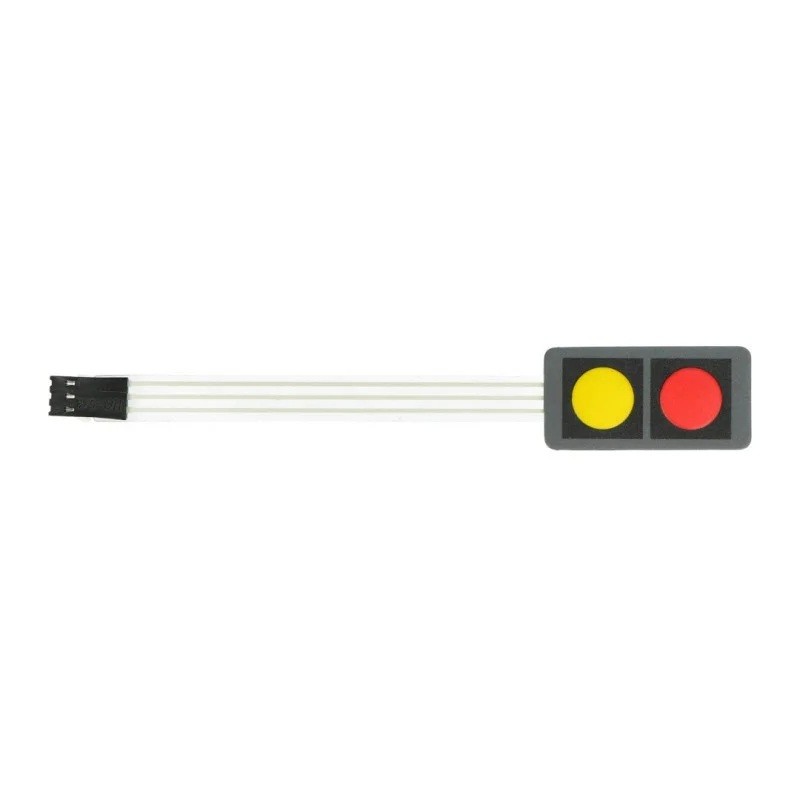
The Red & Yellow 2-Key Matrix Keyboard is a compact two-button input module for Arduino and DIY electronics projects. Its red and yellow keys provide simple momentary switch inputs for menu navigation, selection, control commands and interactive prototypes. The keypad is a passive input component: the microcontroller reads the button state through its digital input pins.
Key Features
Two Button Inputs
Provides two separate keys for simple user commands and control actions.
Red & Yellow Keys
Distinct button colours make it easier to identify each input in a project interface.
Momentary Switching
Each key changes its electrical contact state while pressed and returns when released.
Compact 1×2 Layout
A small two-key keypad arrangement suited to compact control panels and prototypes.
Digital GPIO Input
Can be read by a compatible microcontroller using digital input pins and suitable pull-up or pull-down configuration.
DIY Project Friendly
Useful for menu controls, games, robotics, automation prototypes and STEM learning.
Technical Specifications
| Product Type |
Two-key matrix / membrane switch keypad |
| Key Count |
2 |
| Button Colours |
Red and Yellow |
| Layout |
1×2 (two-key arrangement) |
| Operation |
Momentary switch input |
| Interface |
Passive switch contacts / digital GPIO input |
| Connector |
Three-pin connection reported for this style; verify supplied unit |
| Operating Voltage |
No separate supply required for the passive switch element; use controller logic-level wiring |
| Dimensions |
Not confirmed for this exact stock item |
| Model / Manufacturer |
Not confirmed for this listing |
Compatible Devices and Controllers
- Arduino Uno, Nano and other boards with digital GPIO pins
- ESP32 and ESP8266 development boards, with correct 3.3V logic connections
- Raspberry Pi GPIO projects using suitable input configuration
- Other microcontrollers capable of reading digital switch inputs
Applications
- Up / down or previous / next menu controls
- Start, stop, select and confirm functions
- Simple game controllers and interactive learning projects
- Robotics and automation command inputs
- DIY control panels and electronic prototypes
- STEM demonstrations for digital input programming
Connection and Setup Guide
- Check the actual connector and PCB markings on your supplied keypad before wiring. Do not assume pin order from wire colour alone.
- Identify the common contact and the two individual key signal contacts using the product pinout or a continuity test.
- Connect the common contact to GND when using the microcontroller’s internal pull-up resistors, if supported by the keypad wiring.
- Connect each key signal to a separate digital input pin.
- Configure the pins as INPUT_PULLUP (or use an appropriate external pull-up/pull-down arrangement) and read the button states in your code.
- Add software debounce logic so a single press is not interpreted as multiple rapid presses.
Important Before Buying
- This is a passive switch input, not an active sensor or powered electronic keypad. Do not apply a supply voltage directly to its contacts.
- Confirm the supplied connector pinout before connecting it to a controller. Similar two-key products can use different wiring arrangements.
- Use 3.3V-compatible GPIO wiring with ESP32, ESP8266 and Raspberry Pi boards. Never allow a 5V signal onto a 3.3V-only input.
- Momentary buttons remain active only while pressed; they do not latch their state unless your software implements that behaviour.
- Exact dimensions, cable length, connector style and included accessories are not confirmed for this listing.
Frequently Asked Questions
How many buttons does this keypad have?
It has two keys, one red and one yellow, for separate user input functions.
Are the buttons momentary or latching?
They are described as momentary switches: the contact changes while a key is pressed and returns when released.
Can I use it with Arduino Uno?
Yes. Connect the common and key signal contacts to suitable Arduino pins, configure the inputs with pull-ups or pull-downs as appropriate, and read the button states in your sketch.
Does this keypad need a separate power supply?
No separate supply is normally needed for a passive switch keypad. The controller reads the contact state using its GPIO input circuit.
Can I connect it to an ESP32 or Raspberry Pi?
Yes, if the connector pinout is identified and the wiring uses the controller’s supported logic levels. Keep GPIO inputs within the board’s voltage limits.
Can the two keys be used independently?
They are intended to provide two separate button inputs. Confirm the common and signal connections for your exact unit before programming.
What is switch debouncing?
Mechanical contacts can briefly change state several times during one press. Debouncing in software or hardware filters these transitions so one press is registered reliably.
Is this a full alphanumeric keyboard?
No. It is a compact two-key input module for simple control actions, not a computer keyboard or numeric keypad.
Why Buy from PcGuy Computers?
- Pakistan-based ordering and customer support
- Product information to help select compatible electronics components
- Assistance with basic product and project queries
- Convenient online ordering through PcGuy Computers
Buy Red & Yellow 2-Key Matrix Keyboard in Pakistan
Order the Red & Yellow 2-Key Matrix Keyboard from PcGuy Computers for Arduino experiments, robotics, menu controls and DIY electronics projects. Check the connector pinout and controller voltage limits before installation.

 Pick up from PcGuy Computers Store


 Pick up from PcGuy Computers Store
 AusPost Standard
 AusPost Express


 Arduino Modules & Sensors
 Battery Compartments
 Component Cases
 Electronics Kits
 Microcontroller Boards
 Project Enclosures
 Shields & Hats
 Tablets
 Laptops
 Laptop Accessories
 CPU (Processor)
 CPU Coolers
 GPU (Graphics)
 HDD/ SSD (Storage)
 MOBO (Motherboard)
 PSU (Power Supply)
 RAM (Memory)
 Keyboard & Mouse Combo
 Keyboards
 Printers
 USB
Reviews
There are no reviews yet.