Arduino Example Code
const int grayscalePin = A0;

void setup() {
  Serial.begin(9600);
}

void loop() {

  int sensorValue = analogRead(grayscalePin);

  Serial.print("Grayscale Value: ");
  Serial.println(sensorValue);

  delay(200);
}
Typical Wiring
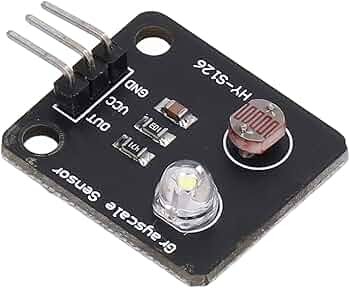
HY-S126 VCC -> Arduino 5V
HY-S126 GND -> Arduino GND
HY-S126 OUT -> Arduino A0
Light and Dark Surface Detection Example
const int grayscalePin = A0;
const int threshold = 500;

void setup() {
  Serial.begin(9600);
}

void loop() {

  int sensorValue = analogRead(grayscalePin);

  Serial.print("Sensor Value: ");
  Serial.println(sensorValue);

  if (sensorValue > threshold) {
    Serial.println("Surface Type A");
  } else {
    Serial.println("Surface Type B");
  }

  delay(200);
}
The example threshold of 500 is only a starting point. Test the module over the actual surfaces used in your project and adjust the threshold accordingly.
How It Works
The HY-S126 uses reflected light to determine the optical characteristics of a nearby surface. Different surfaces absorb and reflect different amounts of light, causing the module's analog output voltage to change.
A microcontroller's analog-to-digital converter can measure this voltage and convert it into a numerical value. On a typical Arduino Uno or Nano, analogRead() returns a value between 0 and 1023.
Calibrating the Sensor
Calibration is recommended because readings can vary depending on the distance from the surface, ambient lighting, surface material, and supply voltage.
- Position the sensor at the intended operating distance.
- Record the reading over the lightest surface.
- Record the reading over the darkest surface.
- Select a threshold approximately between the two readings for simple light/dark detection.
- Use the raw analog values when multiple grayscale levels need to be distinguished.
Common Applications
- Line-following robots
- Black and white surface detection
- Grayscale recognition
- Robot navigation systems
- Reflectivity measurement
- Object and surface detection
- Arduino and STEM education projects
Usage Tips
Keep the sensor at a consistent distance from the surface for the most reliable results. Changes in distance can significantly affect the amount of reflected light reaching the detector.
Strong ambient light, particularly direct sunlight, may also influence readings. If the sensor is being used in changing lighting conditions, shielding the sensing area from external light can improve consistency.
Before using the module for line following or precise surface detection, record real-world readings from each surface and use those measurements to determine suitable thresholds for your project.



 Arduino Modules & Sensors
 Battery Compartments
 Component Cases
 Electronics Kits
 Microcontroller Boards
 Project Enclosures
 Shields & Hats
 Tablets
 Laptops
 Laptop Accessories
 CPU (Processor)
 CPU Coolers
 GPU (Graphics)
 HDD/ SSD (Storage)
 MOBO (Motherboard)
 PSU (Power Supply)
 RAM (Memory)
 Keyboard & Mouse Combo
 Keyboards
 Printers
 USB