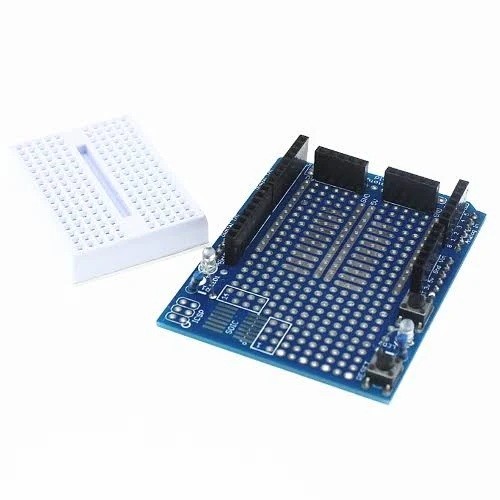
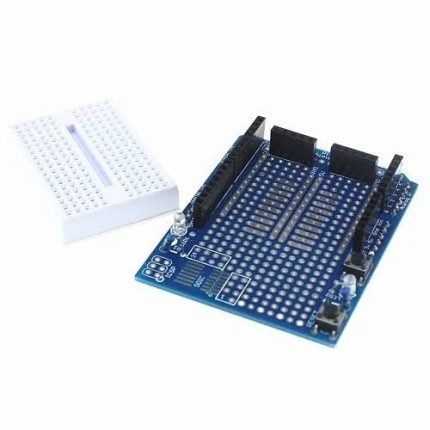
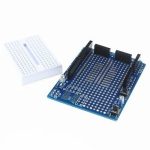
The UNO Proto Shield with Breadboard is an Arduino UNO-format prototyping shield that gives you space to assemble and test custom circuits directly above your controller. It combines a solderable through-hole prototyping area with an included 170-point mini solderless breadboard, so you can experiment without soldering and move a tested design to the solderable area when needed.
It is suited to Arduino development, sensor experiments, electronics learning and one-off circuit builds. The Arduino controller and electronic components are not included unless explicitly listed in the package.
Key Features
170-Point Mini Breadboard
Build and modify temporary circuits using plug-in components and jumper wires without soldering.
Solderable Prototype Area
Use the through-hole grid to assemble a more permanent circuit after testing your design.
UNO Shield Format
Designed to fit the Arduino UNO R3 shield header layout and expose the controller connections for prototyping.
Custom Circuit Development
Build interfaces for LEDs, switches, sensors, resistors, transistors and other compatible components.
Two Prototyping Methods
Switch between reusable solderless breadboard experiments and soldered through-hole construction.
Compact Project Assembly
Mount your prototype over the Arduino to keep a small project together and reduce loose wiring.
Breadboard and Solderable Prototyping
The mini breadboard is useful while a circuit is still changing. Components and jumper wires can be inserted, removed and rearranged during testing. The supplied breadboard is a 170-tie-point type, commonly arranged as 17 rows by 10 columns.
The shield’s separate through-hole area allows components and wires to be soldered into a more permanent prototype. Not every pad on a prototyping grid is necessarily connected to its neighbours; inspect the PCB traces and make the required connections with component leads, solder bridges or hookup wire.
Arduino UNO Compatibility and I/O Access
The shield is designed around the Arduino UNO R3 shield footprint. It provides a convenient physical platform for connecting custom circuits to the controller’s available digital, analogue and power connections. Compatibility with other boards depends on matching header layout, pin functions and electrical requirements.
A basic prototyping shield does not create additional programmable GPIO pins or replace the Arduino controller. Your sketch continues to run on the installed Arduino board.
What Can You Build?
- LED and indicator circuits
- Push-button and switch inputs
- Sensor interface circuits
- Resistor and voltage-divider experiments
- Transistor and MOSFET driver circuits
- Buzzer and small control circuits
- Custom connectors and communication interfaces
- STEM and electronics learning projects
From Breadboard Test to Soldered Prototype
- Fit the shield to a compatible Arduino UNO-format controller.
- Assemble the initial circuit on the mini breadboard.
- Connect the required signal, power and ground lines.
- Upload your Arduino sketch and test the circuit.
- Adjust the wiring and components until the design works as intended.
- If a fixed build is needed, transfer the circuit to the solderable prototyping area.
Important Electrical and Assembly Notes
- Disconnect USB and external power before soldering or modifying the circuit.
- Check component pinouts, polarity and operating voltage before applying power.
- Use current-limiting resistors with LEDs and suitable interface circuitry for external devices.
- Do not drive motors, pumps, solenoids or other high-current loads directly from Arduino GPIO pins. Use an appropriate driver and power supply.
- Check 3.3V device logic requirements when connecting modules to a 5V UNO.
- Do not assume all prototyping holes are electrically connected; verify continuity where necessary.
Technical Specifications
| Product name |
UNO Proto Shield with Breadboard |
| Product type |
Arduino prototyping shield |
| Primary compatibility |
Arduino UNO R3 shield layout |
| Prototyping area |
Solderable through-hole PCB area |
| Included breadboard |
Mini solderless breadboard |
| Breadboard capacity |
170 tie points |
| Breadboard layout |
17 rows × 10 columns |
| Controller I/O access |
UNO digital, analogue and power connections |
| Circuit construction |
Solderless breadboard and soldered prototype methods |
| Programming |
Via installed Arduino controller |
| Programming environment |
Arduino IDE or compatible development software |
| Typical components |
LEDs, resistors, capacitors, switches, ICs and sensors |
| Applications |
Circuit testing, prototyping, STEM and DIY electronics |
| Arduino controller included |
No – controller required separately |
| Board revision |
Generic UNO Proto Shield; exact layout may vary by batch |
Frequently Asked Questions
What is the UNO Proto Shield with Breadboard used for?
It provides a platform for assembling, testing and soldering custom circuits alongside a compatible Arduino UNO controller.
Does this product include the mini breadboard?
Yes. This product is supplied with a 170-point mini solderless breadboard.
Does it include an Arduino UNO?
No. The listing is for the prototyping shield and mini breadboard. A compatible Arduino controller is required separately.
Is it compatible with Arduino UNO R3?
Yes. It is designed around the UNO R3 shield header format. Check physical header alignment before using it with other board variants.
Do I need to solder components to use it?
No. You can build temporary circuits on the mini solderless breadboard. Soldering is only needed when using the shield’s through-hole area for a more permanent build.
Can I reuse the mini breadboard?
Yes. Suitable components and jumper wires can be inserted and removed repeatedly. The breadboard may have adhesive backing for mounting on the shield.
Does the shield add extra programmable I/O pins?
No. It provides a convenient prototyping area and access to the Arduino’s existing connections; it does not add another controller or extra GPIO.
Can I connect sensors to the shield?
Yes. Compatible sensors can be wired into the breadboard or solderable area and connected to the Arduino’s appropriate I/O pins.
Can I build a permanent circuit on the prototyping area?
Yes. The through-hole area can be used to solder components and hookup wires after the circuit has been tested. Check which pads are connected before soldering.
Can I power a motor directly from the shield?
No. The shield is not a motor driver. Use an appropriately rated driver circuit and power source for motors and other higher-current loads.
Can I use 3.3V sensors with an Arduino UNO?
It depends on the sensor’s supply and logic-level requirements. A traditional 5V UNO may need level shifting for 3.3V-only signal inputs.
Are all Proto Shield revisions identical?
No. Generic versions can differ in button, LED, header and pad layouts. Use the markings and physical board as the reference for exact connections.
Why Buy from PcGuy Computers?
| Arduino project range |
Browse related UNO boards, breadboards, sensors and prototyping accessories. |
| Project selection |
Find components for circuit testing, STEM learning, robotics and DIY electronics. |
| Practical product details |
Review compatibility and setup considerations when selecting prototyping hardware. |
The UNO Proto Shield with Breadboard combines a 170-point solderless breadboard and a solderable prototyping area, giving Arduino UNO users two practical ways to build and test custom circuits on one compact platform.
 Pick up from PcGuy Computers Store


 Pick up from PcGuy Computers Store
 AusPost Standard
 AusPost Express
 Arduino Modules & Sensors
 Battery Compartments
 Component Cases
 Electronics Kits
 Microcontroller Boards
 Project Enclosures
 Shields & Hats
 Tablets
 Laptops
 Laptop Accessories
 CPU (Processor)
 CPU Coolers
 GPU (Graphics)
 HDD/ SSD (Storage)
 MOBO (Motherboard)
 PSU (Power Supply)
 RAM (Memory)
 Keyboard & Mouse Combo
 Keyboards
 Printers
 USB
Reviews
There are no reviews yet.