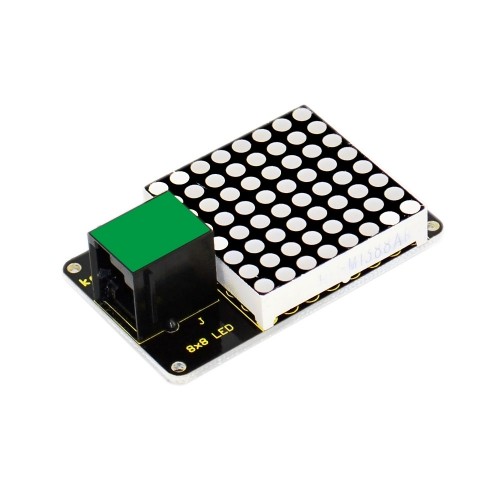
The Keyestudio RJ11 8×8 LED Dot Matrix Module is a compact display board with 64 LED positions, driven by an HT16K33 controller and controlled over I²C. Its Keyestudio EASY Plug RJ11 6P6C connection simplifies wiring with a compatible Keyestudio control board. It can display simple patterns, symbols, characters and animations in Arduino and educational electronics projects.
64-LED Matrix with HT16K33 Driver
The 8-row by 8-column display contains 64 LED positions. The HT16K33 driver handles the matrix control, so the microcontroller communicates over the I²C bus instead of directly controlling all 64 LEDs. Keyestudio documentation for the RJ11 address-select version also describes three DIP switches for selecting the I²C address.
Key Features
8×8 LED Display
64 LED positions for icons, symbols, simple graphics and character patterns.
HT16K33 Driver
Integrated controller manages the LED matrix and communicates with the host over I²C.
Keyestudio RJ11 EASY Plug
RJ11 6P6C connector for compatible Keyestudio EASY Plug control boards.
I²C Communication
Uses the I²C bus to reduce the number of microcontroller pins needed for display control.
Selectable I²C Address
The matching KS0395 address-select version uses three DIP switches to select its I²C address.
Patterns and Animations
Suitable for scrolling effects, simple symbols, icons and educational display experiments.
Technical Specifications
| Brand |
Keyestudio |
| Product |
RJ11 EASY Plug 8×8 LED Matrix Module |
| Likely Keyestudio Reference |
KS0395 (RJ11 address-select version; confirm PCB marking) |
| Display |
8 × 8 LED dot matrix |
| LED Positions |
64 |
| Driver IC |
HT16K33 |
| Communication |
I²C |
| Connector |
RJ11 6P6C Keyestudio EASY Plug interface |
| Operating Voltage |
DC 4.5–5.5V |
| I²C Address Selection |
3 DIP switches on the KS0395 address-select version |
| Dimensions |
56 × 32 × 18mm (KS0395 reference) |
| Weight |
15.2g (KS0395 reference) |
| PcGuy SKU |
BC0001255 |
Compatibility: Important RJ11 Connector Note
This module’s RJ11 socket is a Keyestudio EASY Plug 6P6C connection, not a guarantee of compatibility with every device that has an RJ11 socket. Keyestudio specifically warns that other brands’ RJ11 control boards may use a different internal pin sequence and may not be compatible.
- Use with a compatible Keyestudio EASY Plug control board and the correct 6P6C cable.
- For a non-Keyestudio controller, verify the connector pinout and I²C wiring before connecting.
- The module uses I²C; connect the correct SDA and SCL signals, power and ground when using a compatible breakout arrangement.
- Keep the supply within the documented 4.5–5.5V range.
What Can You Display?
- Simple icons, arrows and status symbols.
- Basic letters, numbers and custom pixel patterns.
- Animated sequences and scrolling effects.
- Visual feedback in robotics, interactive models and STEM projects.
Getting Started
- Connect the module to a compatible Keyestudio EASY Plug control board using the correct RJ11 6P6C cable.
- Power the board within the module’s 4.5–5.5V operating range.
- Install or import the Keyestudio Matrix library required by the example program.
- Run an I²C display example and use the correct address for the DIP-switch configuration.
- Update the pixel pattern data to create your own symbols and animations.
What’s Included
1 × Keyestudio RJ11 8×8 LED Dot Matrix Module, as stated in the PcGuy listing. An RJ11 cable, controller board and power supply are not confirmed as included accessories.
Frequently Asked Questions
How many LEDs are on this dot matrix module?
The display has 8 rows and 8 columns, giving 64 LED positions.
Which driver IC does the Keyestudio 8×8 matrix use?
Keyestudio’s matching RJ11 KS0395 8×8 LED matrix documentation identifies the HT16K33 driver IC.
How does the module communicate with Arduino?
The HT16K33 controller communicates over I²C. Use a compatible Keyestudio EASY Plug control board or verify the correct power, ground, SDA and SCL pinout when connecting another controller.
What is the operating voltage?
Keyestudio specifies DC 4.5–5.5V for the matching KS0395 RJ11 module. Keep the supply within this range.
Can I connect it to any RJ11 port?
No. The RJ11 connector uses Keyestudio’s EASY Plug 6P6C pin arrangement. Other manufacturers may use a different internal pin sequence, even if the connector physically fits.
What are the DIP switches used for?
On the KS0395 address-select version, three DIP switches select the I²C communication address. Set the switches according to Keyestudio’s address table and use the matching address in your code.
Can it display letters and animations?
Yes. You can program the 8×8 pixels to show simple characters, icons, custom patterns and animation frames. The display area is limited to 64 LED positions at a time.
Does the package include an RJ11 cable?
The PcGuy listing specifies one LED matrix module only. It does not confirm that an RJ11 cable or controller board is included.
What are the module dimensions?
Keyestudio lists 56 × 32 × 18mm and 15.2g for the KS0395 RJ11 address-select version. Confirm the PCB reference on the supplied unit if exact fit is important.
Can I use it with a 3.3V microcontroller?
The documented module supply is 4.5–5.5V. A 3.3V controller may require suitable I²C level shifting or a compatible interface; check the electrical levels before connecting SDA and SCL.
Buy the Keyestudio RJ11 8×8 LED Dot Matrix Module in Pakistan for Arduino-compatible display experiments, simple graphics, symbols and animations. For reliable operation, use a compatible Keyestudio EASY Plug 6P6C control board and the specified 4.5–5.5V supply.

 Pick up from PcGuy Computers Store


 Pick up from PcGuy Computers Store
 AusPost Standard
 AusPost Express

 Battery Compartments
 Component Cases
 Electronics Kits
 Microcontroller Boards
 Project Enclosures
 Shields & Hats
 Tablets
 Laptops
 Laptop Accessories
 CPU (Processor)
 CPU Coolers
 GPU (Graphics)
 HDD/ SSD (Storage)
 MOBO (Motherboard)
 PSU (Power Supply)
 RAM (Memory)
 Keyboard & Mouse Combo
 Keyboards
 Printers
 USB
Reviews
There are no reviews yet.