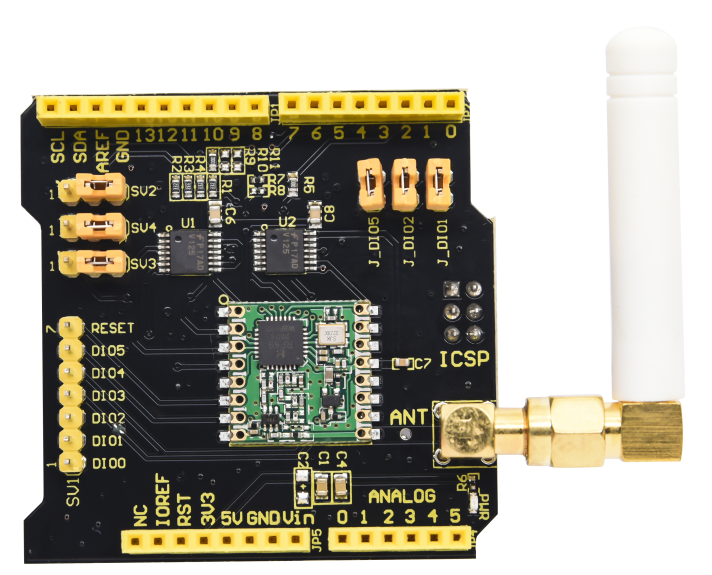
The Keyestudio KS0515 FSK Wireless Expansion Shield is an Arduino-compatible sub-GHz wireless transceiver board built around the RFM69HCW radio and designed for the 868MHz band. It enables compatible microcontroller projects to send and receive compact data packets over a radio link, making it useful for remote sensors, telemetry, irrigation experiments and building automation prototypes.
The shield communicates with its host controller over SPI, provides configurable SPI and chip-select routing, and includes an I-PEX connector for an external antenna. It is a dedicated FSK radio shield, not a Wi-Fi, Bluetooth or LoRa adapter. A compatible Arduino controller and suitable antenna are required separately unless included in the package.
Key Features
RFM69HCW Transceiver
Supports bidirectional wireless communication, allowing compatible devices to transmit and receive data.
868MHz FSK Radio
Designed for sub-GHz FSK communication in low-data-rate sensor and embedded applications.
SPI Interface
Connects the radio to the Arduino controller through SPI with selectable routing options.
External I-PEX Antenna
Provides an I-PEX connector for a suitable antenna matched to the operating frequency.
3.3V and 5V I/O Compatibility
Keyestudio lists compatibility with supported Arduino boards using 3.3V or 5V I/O.
Packet-Based Data Transfer
Radio features include packet handling, CRC, preamble detection, RSSI and automatic frequency correction.
RFM69HCW 868MHz Wireless Transceiver
The onboard RFM69HCW is a sub-GHz radio transceiver. Unlike a simple one-way transmitter, a transceiver can both send and receive data, allowing two compatible KS0515-equipped controllers to exchange messages and implement two-way communication in software.
The radio is intended for embedded applications where compact data packets, range and low-power operation are more important than high-bandwidth internet connectivity.
FSK Communication
FSK stands for Frequency Shift Keying. It represents digital information by shifting the radio carrier between defined frequencies. Keyestudio identifies the KS0515 for FSK wireless applications and mentions systems such as WMBus and IEEE 802.15.4g when used with suitable configuration and software.
The KS0515 is not a LoRa radio. FSK and LoRa use different modulation methods, so an RFM69HCW-based shield cannot communicate directly with a LoRa device simply because both operate in a sub-GHz band.
Wireless Range and Antenna
Keyestudio specifies an approximate outdoor, barrier-free communication range of 200–500 metres. The manufacturer also describes distances up to approximately 5,000 metres with a suitable directional antenna and favourable conditions. These are manufacturer-stated figures, not guaranteed working distances.
Actual range depends on antenna type and placement, antenna height and orientation, transmit power, data rate, receiver sensitivity, terrain, obstacles, interference and local radio restrictions. The board provides an I-PEX antenna connector; use an antenna designed for the correct operating band and connector.
RF Output and Receiver Performance
Keyestudio lists radio output up to +20dBm (100mW) and receiver sensitivity down to approximately -148dBm under applicable operating conditions. The listed maximum link budget is 168dB. These are radio capability figures and do not guarantee a particular link distance or authorize operation at maximum power in every location.
The RFM69HCW also supports a programmable bit rate up to 300kbps. Higher data rates can reduce link range or robustness in some configurations, so select settings for the requirements of the application rather than assuming the maximum rate is always best.
SPI Routing and Arduino Pin Configuration
The KS0515 uses SPI to communicate with the controller. Keyestudio provides jumper caps to route the SPI signals either through the ICSP header or through the conventional UNO digital pins.
| SPI signal |
ICSP routing |
Alternative digital-pin routing |
| CLK / SCK |
ICSP CLK |
D13 |
| DI / MOSI |
ICSP MOSI |
D11 |
| DO / MISO |
ICSP MISO |
D12 |
Keyestudio also documents these radio signal connections:
| Radio signal |
Arduino pin |
| DIO5 |
D8 |
| DIO2 |
D7 |
| DIO1 |
D6 |
Configurable Chip-Select Connection
The radio chip-select (CS) connection is configured through a 0Ω resistor position on the board. Keyestudio documents R9 as the default connection to D10, with R10 as an alternative for D5 and R11 as an alternative for D4.
- R9: CS connected to Arduino D10 (documented default)
- R10: CS connected to Arduino D5
- R11: CS connected to Arduino D4
Use only the intended routing configuration and make sure the pin assignment in your sketch matches the physical board configuration. Do not assume that changing a software pin definition changes the resistor routing on the PCB.
Arduino Compatibility
Keyestudio lists compatibility with Arduino UNO, Mega, Leonardo and Due, and describes the shield as suitable for supported 3.3V or 5V I/O Arduino boards. Select the correct SPI routing and pin definitions for the controller in use. Check the exact board’s electrical and header layout before installation.
Arduino Software and RadioHead Library
Keyestudio’s example programs use the Arduino RadioHead library, including the RH_RF69 driver and RHReliableDatagram for addressed and acknowledged packet communication. Install the required library before compiling the example sketches.
Both ends of a wireless link must use compatible frequency, modulation, data-rate and packet settings. Important frequency note: the product is specified as an 868MHz shield, while some example code in the documentation contains a different frequency value. Set the software frequency to match the actual radio version and ensure that the selected frequency is permitted for use in your location.
Typical Applications
- Wireless sensor nodes and remote monitoring
- Arduino-to-Arduino point-to-point communication
- Telemetry and equipment status reporting
- Irrigation and agriculture monitoring experiments
- Building automation prototypes
- Environmental data collection
- Smart metering and low-data-rate embedded networks
- Wireless control and command links using suitable system design
Technical Specifications
| Brand |
Keyestudio |
| Model |
KS0515 |
| Product type |
FSK wireless transceiver expansion shield |
| Radio transceiver |
RFM69HCW |
| Frequency band |
868MHz version |
| Modulation |
FSK |
| Host communication |
SPI |
| Maximum RF output |
Up to +20dBm / 100mW, subject to configuration and local regulations |
| Maximum link budget |
168dB (manufacturer specification) |
| Programmable bit rate |
Up to 300kbps |
| Receiver sensitivity |
Down to approximately -148dBm under applicable conditions |
| Receive current |
Approximately 10.3mA (manufacturer specification) |
| RSSI dynamic range |
127dB |
| Packet engine |
Up to 256 bytes with CRC |
| Antenna connector |
External I-PEX |
| I/O compatibility |
3.3V / 5V supported Arduino I/O |
| Listed Arduino compatibility |
UNO, Mega, Leonardo and Due |
| Manufacturer-stated outdoor range |
Approximately 200–500m, barrier-free conditions |
| Manufacturer-stated optimised range |
Up to approximately 5,000m with suitable directional antenna and conditions |
| Controller included |
No – compatible Arduino controller required separately |
Important RF and Setup Notes
- Use an antenna designed for the 868MHz version and compatible with the I-PEX connector.
- Match the software frequency and radio settings at both transmitting and receiving devices.
- Check the SPI jumper positions and CS resistor routing before selecting pins in the sketch.
- Keep DIO1, DIO2 and DIO5 assignments in mind when connecting other shields or modules.
- Check local radio regulations for permitted frequency, output power, antenna and operating conditions.
- Do not transmit without an appropriate antenna connected to the RF output.
- Wi-Fi, Bluetooth and LoRa devices are not directly interchangeable with this FSK transceiver.
Frequently Asked Questions
What is the Keyestudio KS0515?
It is an Arduino-compatible wireless expansion shield using an RFM69HCW sub-GHz FSK transceiver, specified for the 868MHz band.
Can the KS0515 transmit and receive data?
Yes. The RFM69HCW is a transceiver, so compatible devices can both send and receive wireless packets.
Which frequency does this version use?
This KS0515 product version is specified for 868MHz. Configure the software to match the actual hardware and applicable local radio rules.
Is the KS0515 a LoRa shield?
No. It uses the RFM69HCW with FSK modulation. It is not a LoRa transceiver and cannot directly communicate with LoRa radios using a different modulation system.
Does it provide Wi-Fi or Bluetooth?
No. It provides sub-GHz FSK radio communication. A suitable gateway would be needed to connect it to Wi-Fi or consumer devices.
How far can it communicate?
Keyestudio specifies approximately 200–500m outdoors without barriers and up to approximately 5,000m with a suitable directional antenna under favourable conditions. Actual results vary with antenna, settings, terrain and interference.
Does it include an antenna?
The shield has an I-PEX external antenna connector. Check the package contents to confirm whether a separate antenna is included; use an antenna matched to the 868MHz version.
Which Arduino boards are compatible?
Keyestudio lists Arduino UNO, Mega, Leonardo and Due. Check the correct SPI routing and pin configuration for your controller.
How does the shield connect to Arduino?
It uses SPI. Jumper caps select ICSP routing or the conventional D13, D11 and D12 connections, while the chip-select routing is selected by the board’s 0Ω resistor position.
Which pins are used for radio DIO signals?
Keyestudio documents DIO5 to D8, DIO2 to D7 and DIO1 to D6. Check these assignments when adding other hardware.
Which Arduino library can I use?
Keyestudio’s example code uses the RadioHead library with RH_RF69 and RHReliableDatagram. Install the library before compiling the examples.
Can two KS0515 shields communicate with each other?
Yes. Two compatible systems can exchange packets when frequency, modulation, data-rate and other radio settings match.
Does the shield include an Arduino controller?
No. The KS0515 is the wireless expansion shield. A compatible Arduino controller is required separately unless the package explicitly states otherwise.
Can I use the maximum 100mW RF output everywhere?
Not necessarily. Permitted frequencies, transmit power and antenna configurations vary by location. Configure and operate the radio in accordance with applicable local regulations.
Why Buy from PcGuy Computers?
| Arduino and Keyestudio range |
Explore compatible development boards, wireless shields and electronic modules. |
| Wireless project components |
Find hardware for sensor networks, telemetry, automation and prototyping. |
| Practical product information |
Review frequency, interface and configuration details before choosing components. |
The Keyestudio KS0515 FSK Wireless Expansion Shield adds 868MHz RFM69HCW radio communication to compatible Arduino projects. With SPI connectivity, configurable pin routing and an external I-PEX antenna connector, it is suited to wireless sensor, telemetry and remote-monitoring prototypes.


 Pick up from PcGuy Computers Store


 Pick up from PcGuy Computers Store
 AusPost Standard
 AusPost Express

 Arduino Modules & Sensors
 Battery Compartments
 Component Cases
 Electronics Kits
 Microcontroller Boards
 Project Enclosures
 Shields & Hats
 Tablets
 Laptops
 Laptop Accessories
 CPU (Processor)
 CPU Coolers
 GPU (Graphics)
 HDD/ SSD (Storage)
 MOBO (Motherboard)
 PSU (Power Supply)
 RAM (Memory)
 Keyboard & Mouse Combo
 Keyboards
 Printers
 USB
Reviews
There are no reviews yet.