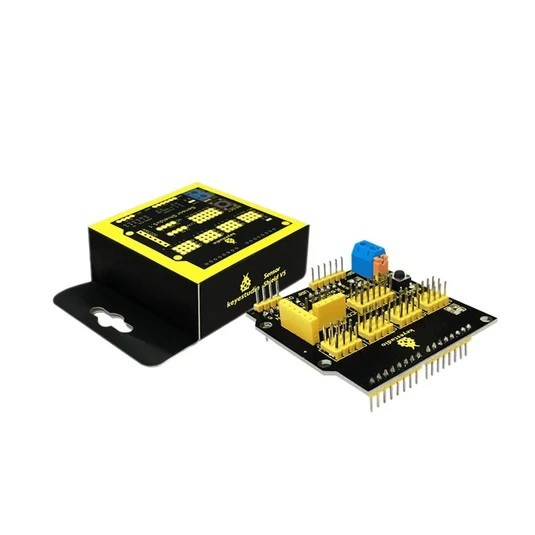
The Keyestudio KS0004 UNO R3 V5.1 Sensor Shield is an Arduino expansion board that makes it easier to connect multiple sensors and modules to a compatible UNO R3 controller. It breaks out the controller’s digital and analogue I/O into convenient three-pin G / V / S headers and provides separate Serial, I2C, SPI, URF and APC220 interfaces.
The shield also includes an external VCC/GND terminal block, an SE power-selection jumper, a reset button and power/D13 indicators. It is designed to organise sensor wiring and provide connection access; it does not add a separate microcontroller or increase the UNO’s native I/O count.
Key Features
3-Pin G / V / S Headers
Breaks out digital and analogue connections into grouped ground, voltage and signal headers for compatible three-wire modules.
Digital and Analogue I/O
Provides convenient access to the UNO R3’s existing digital and analogue ports without repeatedly wiring each connection on a breadboard.
Serial, I2C and SPI
Includes dedicated breakout connections for common communication interfaces and compatible peripherals.
URF and APC220 Interfaces
Provides connection options for compatible URF and APC220 modules; the modules are separate accessories unless included in the package.
External Sensor Power
VCC/GND screw terminals and the SE jumper provide configurable power distribution to sensor supply rails.
Reset and Status Indicators
Features an accessible reset button, a power indicator and a D13 signal indicator for convenient testing.
Organised G / V / S Sensor Connections
The shield routes the UNO’s digital and analogue ports to three-pin sensor headers. The labels represent:
- G: Ground reference
- V: Sensor power rail
- S: Signal connection for the corresponding controller pin
This layout is used by many Arduino-compatible sensor modules and can reduce loose wiring in multi-sensor builds. Always check the module’s pin order and operating voltage before connecting it; a matching three-pin plug does not guarantee electrical compatibility.
Digital and Analogue Expansion
Digital headers can be used with compatible switches, LEDs, buzzers, PIR sensors and other digital modules. Analogue headers provide access to the UNO’s analogue inputs for devices such as potentiometers, light sensors, analogue temperature sensors and other variable-voltage modules.
The shield exposes the controller’s existing pins rather than creating additional programmable I/O. The pin number used in the Arduino sketch remains the corresponding UNO pin.
Serial, I2C and SPI Interfaces
The KS0004 brings out common communication connections for compatible external hardware:
- Serial (UART): For compatible serial peripherals such as wireless modules and other controllers. Hardware attached to the UNO’s primary serial pins can affect USB serial communication or sketch uploading.
- I2C: For compatible displays, real-time clocks and digital sensors sharing the data and clock bus. Check device addresses and voltage requirements.
- SPI: For compatible displays, storage devices and communication modules. Check chip-select wiring and avoid pin conflicts when using multiple devices.
URF and APC220 Module Connections
The shield includes dedicated URF and APC220 interfaces. These provide convenient connection points for compatible modules. An APC220 radio or other communication module is not included unless explicitly stated in the product package. Confirm the exact module pinout and electrical requirements before connecting it.
External Power and SE Jumper Configuration
The blue VCC/GND terminal block can provide an external supply to the sensor power rails. The SE jumper changes how the V, V1 and + rails are connected. Keyestudio documents the following examples using a 7V external input:
| SE jumper |
External VCC/GND input |
V rail |
V1 and + rails |
| Connected |
7V applied |
7V |
7V |
| Connected |
No external input; UNO powers shield |
5V |
5V |
| Disconnected |
7V applied |
7V |
0V |
| Disconnected |
No external input; UNO powers shield |
0V |
5V |
Important: These examples describe the shield’s rail routing, not a universal safe voltage for every sensor. With the jumper connected, the documented 7V input can place 7V on the V, V1 and + rails. A 5V-only or 3.3V-only module can be damaged by an unsuitable supply. Verify the required voltage of every connected device, inspect the jumper position and confirm the terminal polarity before applying external power.
Reset Button and Status Indicators
The onboard reset button provides convenient access to the controller’s reset function without removing the shield. A power indicator shows that the board is receiving power, while the D13 indicator provides visual feedback associated with the UNO’s digital pin 13.
Compatible Controllers
Keyestudio lists the following controller families for the KS0004:
- Keyestudio UNO R3 board / Arduino UNO R3
- Keyestudio EASY Plug Control Board
- Keyestudio Leonardo R3 Development Board
- 51duino
When using a controller other than an UNO R3, check its pin mapping, electrical behaviour and software configuration. Physical fit alone does not guarantee that every interface will behave identically.
Example Project Ideas
- Connect a PIR motion sensor and compatible LCD display
- Build multi-sensor monitoring prototypes
- Experiment with I2C displays and environmental sensors
- Connect compatible serial or wireless communication modules
- Develop robotics and automation prototypes
- Explore digital and analogue sensor programming in STEM activities
Technical Specifications
| Brand |
Keyestudio |
| Model |
KS0004 |
| Product name |
UNO R3 V5.1 Sensor Shield |
| Product type |
Sensor and I/O expansion shield |
| Primary compatibility |
Keyestudio UNO R3 / Arduino UNO R3 |
| Additional listed compatibility |
Keyestudio EASY Plug Control Board, Leonardo R3 Development Board and 51duino |
| Digital I/O |
UNO digital ports broken out to 3-pin headers |
| Analogue I/O |
UNO analogue ports broken out to 3-pin headers |
| Sensor header layout |
G / V / S (Ground / Voltage / Signal) |
| Serial interface |
Yes |
| I2C interface |
Yes |
| SPI interface |
Yes |
| Additional interfaces |
URF and APC220 |
| External power connection |
VCC / GND terminal block |
| Power configuration |
SE jumper |
| Reset button |
Yes |
| Indicators |
Power and D13 |
| Communication header pitch |
2.54mm |
| Dimensions |
57 × 57 × 20mm |
| Weight |
Approximately 20.5g |
| Controller included |
No – compatible controller required separately |
Important Setup and Compatibility Notes
- Confirm G, V and S orientation before plugging in a sensor cable.
- Check sensor voltage ratings before powering the V rail from the external terminal block.
- Set the SE jumper according to the required rail arrangement and the Keyestudio pinout instructions.
- Check Serial, I2C, SPI and sensor pin usage to avoid assigning the same controller pins to conflicting functions.
- Do not connect motors, pumps or other high-current loads directly to sensor signal headers; use appropriate driver circuitry and a suitable supply.
- The shield is an expansion board and does not include the UNO controller or separate communication modules unless the package explicitly says so.
Frequently Asked Questions
What is the Keyestudio KS0004 Sensor Shield?
It is an Arduino expansion shield that breaks out the UNO’s digital and analogue ports into G/V/S sensor headers and provides Serial, I2C, SPI, URF, APC220 and external power connections.
Is the KS0004 compatible with Arduino UNO R3?
Yes. Keyestudio specifies compatibility with its UNO R3 board and the Arduino UNO R3.
What do G, V and S mean?
G is ground, V is the sensor supply rail and S is the signal connection associated with the corresponding controller pin.
Does it add more programmable Arduino pins?
No. It makes the UNO’s existing digital and analogue pins easier to connect but does not increase the controller’s native I/O count.
Does the shield support I2C and SPI?
Yes. It provides dedicated I2C and SPI breakout connections, as well as a Serial interface, for compatible peripherals.
What are the URF and APC220 interfaces for?
They are connection interfaces for compatible modules. The corresponding URF or APC220 module is separate unless specifically listed as included in the package.
Can I power sensors using the terminal block?
Yes. The VCC/GND terminal block and SE jumper configure power distribution to the sensor rails. Check the board pinout and the voltage rating of every connected module before applying power.
What does the SE jumper do?
It changes how the V, V1 and + sensor power rails are connected. The resulting rail voltages depend on the jumper position and whether external power is applied.
Can the sensor rails carry 7V?
Keyestudio documents a 7V external-input example in which the connected SE jumper routes 7V to V, V1 and +. This can damage lower-voltage sensors. Only use a voltage permitted by every connected device and follow the official pinout instructions.
Does the shield have a reset button?
Yes. It extends the controller’s reset function to an accessible button on the shield.
Does it include an Arduino UNO board?
No. The KS0004 is the sensor expansion shield. A compatible controller is required separately unless the product package explicitly states otherwise.
Can I connect a motor directly to the sensor headers?
No. The headers are for compatible sensor and signal connections, not high-current motor driving. Use an appropriate motor driver or switching circuit and a correctly rated power supply.
What are the board dimensions?
Keyestudio lists the KS0004 dimensions as approximately 57 × 57 × 20mm and its weight as approximately 20.5g.
Why Buy from PcGuy Computers?
| Arduino and Keyestudio range |
Explore compatible development boards, shields, sensors and electronic modules. |
| Project components |
Find hardware for STEM learning, robotics, automation and electronics prototyping. |
| Practical product information |
Review compatibility, interfaces and power configuration notes before choosing components. |
The Keyestudio KS0004 UNO R3 V5.1 Sensor Shield organises Arduino digital and analogue connections into G/V/S headers and adds Serial, I2C, SPI, URF, APC220 and configurable sensor power connections. It is a practical expansion board for multi-sensor projects, robotics, STEM learning and prototyping.


 Pick up from PcGuy Computers Store


 Pick up from PcGuy Computers Store
 AusPost Standard
 AusPost Express

 Arduino Modules & Sensors
 Battery Compartments
 Component Cases
 Electronics Kits
 Microcontroller Boards
 Project Enclosures
 Shields & Hats
 Tablets
 Laptops
 Laptop Accessories
 CPU (Processor)
 CPU Coolers
 GPU (Graphics)
 HDD/ SSD (Storage)
 MOBO (Motherboard)
 PSU (Power Supply)
 RAM (Memory)
 Keyboard & Mouse Combo
 Keyboards
 Printers
 USB
Reviews
There are no reviews yet.