What Is a Step-Up Converter?
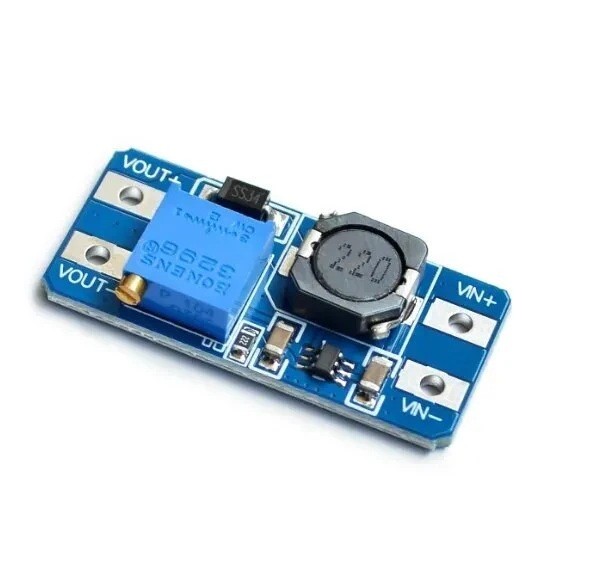
A DC-DC step-up converter, also known as a boost converter, takes a lower DC voltage and converts it into a higher DC voltage.
Example:

5V Input  -> MT3608 -> 9V Output

5V Input  -> MT3608 -> 12V Output

12V Input -> MT3608 -> 18V Output
The MT3608 is a step-up converter only. It cannot normally reduce voltage. The required output voltage must therefore be higher than the input voltage.
Typical Wiring
Power Supply + -> MT3608 IN+
Power Supply - -> MT3608 IN-

MT3608 OUT+ -> Device +
MT3608 OUT- -> Device -
Setting the Output Voltage
Before connecting your device to the output, use a multimeter to set the required voltage.
- Connect your DC power source to IN+ and IN-.
- Set your multimeter to DC voltage.
- Measure between OUT+ and OUT-.
- Slowly turn the onboard adjustment potentiometer.
- Continue adjusting until the required output voltage is displayed.
- Disconnect power before connecting your load.
- Reconnect power and confirm the voltage remains suitable under load.
Important: The Adjustment Potentiometer May Require Several Turns
The onboard potentiometer is a multi-turn adjustment control. Depending on its previous setting, it may require several complete rotations before you notice a significant change in output voltage.
If the output does not appear to change immediately, continue turning the adjustment screw while monitoring the output with a multimeter.
Example: Creating a 12V Supply from 5V
5V Power Supply
      |
      v
MT3608 IN+ / IN-
      |
      |  Adjust output to 12V
      v
MT3608 OUT+ / OUT-
      |
      v
12V Load
This can be useful when a project has a 5V power source but also contains a device that requires a higher voltage.
Understanding the 2A Rating
The advertised 2A maximum should not be interpreted as meaning the module can always supply 2A at any output voltage.
A boost converter must draw additional current from the input when increasing voltage. For example, producing 12V at 1A requires approximately 12 watts of output power. A 5V input would therefore need to supply considerably more than 2A once conversion losses are taken into account.
Higher Output Voltage
        +
Higher Output Current
        =
More Input Power Required
For reliable operation, allow plenty of current capacity from the input power source and avoid operating the module continuously at its absolute maximum rating.
Using the MT3608 with Arduino
The MT3608 does not require programming or Arduino code. It is a standalone power converter and can operate independently from a microcontroller.
It can, however, be useful within Arduino projects where different components require different supply voltages.
5V Supply
   |
   +-------> Arduino 5V
   |
   +-------> MT3608
                |
                +-------> Higher Voltage Device
Always ensure that the grounds are connected appropriately when the Arduino and boosted device need to share electrical signals.
Common Applications
- Arduino and ESP32 electronics projects
- Battery-powered devices
- Portable electronics
- Robotics projects
- LED lighting projects
- DIY power supplies
- Increasing battery voltage
- Powering higher-voltage sensors and modules
- Prototype electronics
- STEM education projects
Important Usage Tips
Always adjust and verify the output voltage with a multimeter before connecting sensitive electronics. An incorrectly adjusted output voltage can permanently damage the connected device.
Do not exceed the module's specified input or output voltage limits, and remember that the maximum practical output current decreases as the difference between input and output voltage increases.
The module may become warm when supplying higher currents. Adequate airflow and conservative operating loads will improve reliability, particularly when the converter is installed inside an enclosure.
When powering a project from batteries, remember that boosting the voltage does not create additional energy. Higher output voltage and current will result in greater current being drawn from the battery and may significantly reduce runtime.



 Arduino Modules & Sensors
 Battery Compartments
 Component Cases
 Electronics Kits
 Microcontroller Boards
 Project Enclosures
 Shields & Hats
 Tablets
 Laptops
 Laptop Accessories
 CPU (Processor)
 CPU Coolers
 GPU (Graphics)
 HDD/ SSD (Storage)
 MOBO (Motherboard)
 PSU (Power Supply)
 RAM (Memory)
 Keyboard & Mouse Combo
 Keyboards
 Printers
 USB