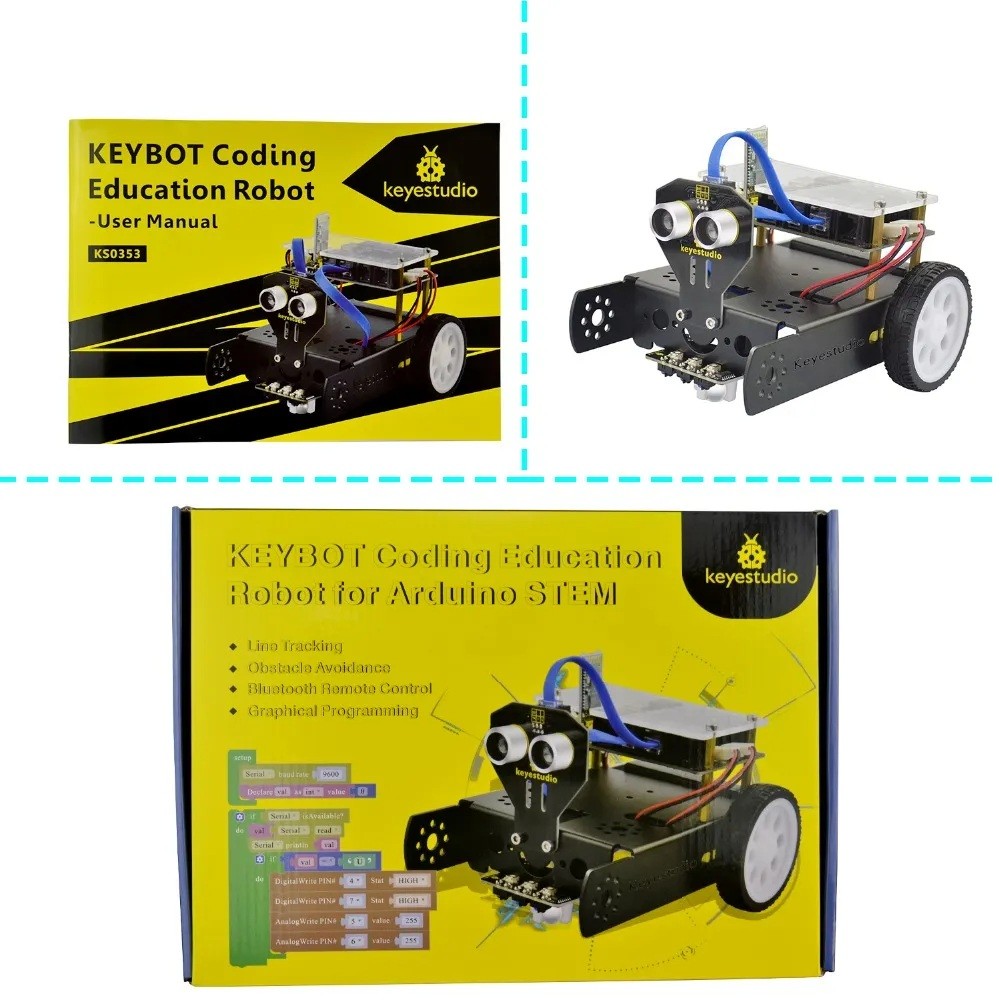
The Keyestudio KS0353 KEYBOT Coding Education Robot is a DIY Arduino-based robot car kit for learning coding, electronics and robotics through hands-on projects. It features an integrated KEYBOT control board, two DC gear motors, three groups of line-tracking sensors, an ultrasonic obstacle-detection module and an HC-06 Bluetooth module. Learn Arduino C programming and graphical coding with Mixly. The kit includes its own integrated controller; a separate Arduino Uno board is not required.
Build and Program Your Own KEYBOT Robot
The KS0353 combines a metal robot structure, control electronics, sensors and motors in one educational platform. Assemble the robot, connect its modules using the supplied RJ11 cables, then program its movement and sensor responses. The manufacturer describes the assembly process as a beginner-friendly DIY activity.
Integrated Arduino-Compatible KEYBOT Control Board
The dedicated KEYBOT control board integrates an ATmega328P-AU microcontroller with a TB6612FNG motor driver and USB-to-serial interface. It is based on the Arduino platform and provides RJ11 sockets for connecting compatible sensors and modules using the included cables. Two motor outputs and two servo interfaces support practical robotics experiments.
Line Tracking with Three Sensor Groups
Three groups of line-tracking sensors detect black and white surfaces, allowing the robot to follow a marked path when programmed accordingly. The manufacturer also describes their use for anti-fall control experiments. This is a useful way to learn how sensor readings can guide a robot’s movement.
Ultrasonic Obstacle Avoidance
The included ultrasonic module measures the distance to objects in front of the robot. A program can use the detected distance to trigger a turn or other movement response when an obstacle is near, introducing learners to distance sensing and conditional logic.
Bluetooth Remote Control
The kit includes an HC-06 Bluetooth module for wireless control from a compatible mobile device. Follow the official setup instructions to configure the Bluetooth module and use the supported control project. The manufacturer’s guide instructs users to switch Bluetooth off while uploading programs.
Arduino C and Mixly Block Programming
Learn text-based Arduino C programming as well as graphical, block-based programming with Mixly. Beginners can start with visual programming concepts, then progress to writing code for LEDs, motor movement, line tracking, obstacle avoidance and Bluetooth control.
Key Features
Integrated Control Board
Arduino-based KEYBOT board with ATmega328P-AU microcontroller and built-in motor driver.
Three Line Sensor Groups
Detect black-and-white paths for line-following and suitable anti-fall experiments.
Ultrasonic Detection
Measures the distance to obstacles so programmed movement can respond.
HC-06 Bluetooth
Supports wireless robot control from a compatible Bluetooth-enabled mobile device.
Dual DC Gear Motors
Two geared motors provide differential movement for forward, reverse and turning actions.
Arduino C and Mixly
Learn text-based coding and graphical block programming through guided projects.
Easy RJ11 Connections
Connect supported sensor modules to the controller using the supplied 6P6C cables.
DIY Robot Assembly
Build the robot body and fit its motors, wheels, sensors and control board.
Keyestudio KS0353 Technical Specifications
| Brand |
Keyestudio |
| Model |
KS0353 KEYBOT |
| Product Type |
Coding Education Robot / DIY Robot Car Kit |
| Main Control Chip |
ATmega328P-AU |
| Motor Driver |
TB6612FNG |
| USB-to-Serial Chip |
ATmega16U2-MU |
| Motor Type |
Two DC single-shaft gear motors |
| Motor Speed |
100 RPM at 6.0V (manufacturer specification) |
| Motor Driver Current |
1.2A average / 3.2A peak |
| External Input Voltage |
DC 7–12V |
| Minimum Current Range |
800mA |
| Standby Current |
47mA |
| Line Tracking |
Three groups of black-and-white line-tracking sensors |
| Obstacle Detection |
Ultrasonic sensor module |
| Wireless Module |
HC-06 Bluetooth |
| Servo Interfaces |
2 (D9 and D10) |
| Sensor Connections |
8 RJ11 sockets |
| Programming |
Arduino C and Mixly graphical block programming |
KEYBOT Control Board and Connections
The KEYBOT board combines the controller and motor driver, so the robot can drive its two DC motors directly. It provides eight RJ11 sockets for compatible sensor and module connections, two servo interfaces, a Bluetooth interface, motor connectors marked MA and MB, a power input, reset button and control switches. The integrated buzzer can also be used in suitable coding activities.
Projects You Can Explore
- Light up an LED and control its brightness with PWM
- Drive the two motors and experiment with speed control
- Program the KEYBOT to follow a black-and-white line
- Build an ultrasonic obstacle-avoidance routine
- Control the robot wirelessly using the HC-06 Bluetooth module
- Experiment with sensor inputs, conditions and robot movement
What’s Included in the KS0353 Package?
- 1 × KEYBOT control board
- 1 × acrylic top panel for the control board
- 1 × ultrasonic sensor module
- 1 × line-tracking sensor module
- 1 × HC-06 Bluetooth module
- 1 × W420 steel universal wheel and 2 × 6515 robot wheels
- 2 × single-shaft gear motors (left and right)
- 1 × 18650 two-cell battery holder
- 1 × six-cell AA battery case
- 1 × KEYBOT body holder
- 1 × EASY Plug white Piranha LED module
- 1 × 10cm and 2 × 20cm 6P6C RJ11 cables
- 1 × USB cable
- Mounting pillars, screws, nuts, screwdriver and Allen wrench
Power note: Battery holders are listed in the package inventory, but batteries are not listed as included. Arrange compatible batteries separately and follow the recommended 7–12V external input range. A separate Arduino Uno board is not needed because the KEYBOT control board is included.
Who Is the KEYBOT Robot For?
- Students learning Arduino and robotics
- STEM and school robotics programs
- Beginners exploring block-based coding
- Electronics and DIY robot hobbyists
- Teachers and coding educators
- Makers interested in line-following and obstacle-avoidance robots
Frequently Asked Questions
What is the Keyestudio KS0353 KEYBOT?
It is a DIY coding education robot kit based on the Arduino platform. It combines an integrated controller, motors, line-tracking sensors, ultrasonic sensing and Bluetooth for hands-on robotics projects.
Does the KS0353 include an Arduino control board?
Yes. It includes the dedicated KEYBOT control board, which is Arduino-based and uses an ATmega328P-AU microcontroller. You do not need to buy a separate Arduino Uno board for the standard KEYBOT setup.
Can the KEYBOT follow a line?
Yes. Its three groups of line-tracking sensors detect black-and-white paths for programmed line-following projects.
Can the KS0353 avoid obstacles?
Yes. The included ultrasonic module measures the distance to objects, allowing a programmed robot to respond when an obstacle is detected.
Does the robot support Bluetooth control?
Yes. An HC-06 Bluetooth module is included for wireless control using a compatible mobile device and the appropriate project setup.
Which programming languages or platforms can I use?
The manufacturer provides Arduino C programming and Mixly graphical block-programming tutorials for the KEYBOT.
What is the required input voltage?
The manufacturer’s specifications list an external input voltage range of DC 7–12V. Follow the kit’s power and wiring instructions when selecting a supply.
Are batteries included?
The package inventory lists both a two-cell 18650 holder and a six-cell AA battery case. Batteries themselves are not listed as included, so check and arrange compatible batteries separately.
What is the TB6612FNG motor driver used for?
The TB6612FNG is the integrated motor driver used to control the KEYBOT’s two DC motors, including their direction and speed.
What comes in the Keyestudio KS0353 box?
The kit includes the KEYBOT control board, robot body and acrylic panel, motors, wheels, ultrasonic and line-tracking sensors, HC-06 Bluetooth module, battery holders, cables, LED module and assembly hardware.
Buy the Keyestudio KS0353 KEYBOT Coding Education Robot in Pakistan from PcGuy Computers. Build and program a DIY Arduino robot with line tracking, ultrasonic obstacle detection, Bluetooth control and Mixly block coding. Batteries are not listed as included.


 Pick up from PcGuy Computers Store


 Pick up from PcGuy Computers Store
 AusPost Standard
 AusPost Express

 Arduino Modules & Sensors
 Battery Compartments
 Component Cases
 Electronics Kits
 Microcontroller Boards
 Project Enclosures
 Shields & Hats
 Tablets
 Laptops
 Laptop Accessories
 CPU (Processor)
 CPU Coolers
 GPU (Graphics)
 HDD/ SSD (Storage)
 MOBO (Motherboard)
 PSU (Power Supply)
 RAM (Memory)
 Keyboard & Mouse Combo
 Keyboards
 Printers
 USB
Reviews
There are no reviews yet.