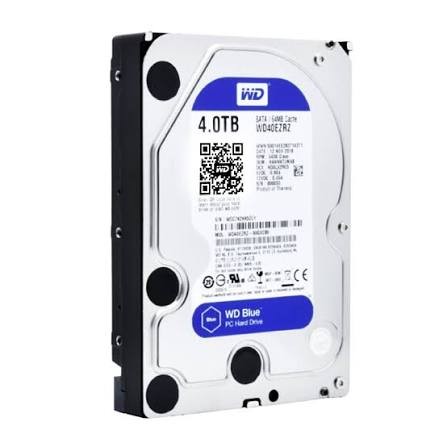
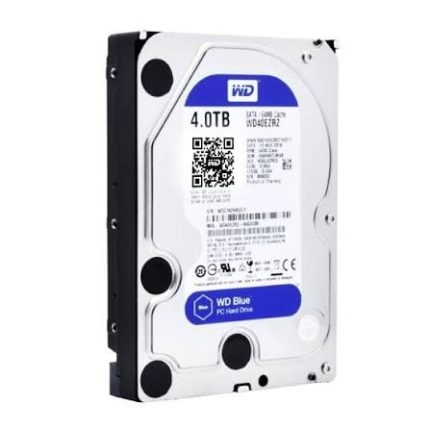
WD Blue 4TB 3.5" SATA HDD provides high-capacity internal storage for desktop computers and compatible PC systems. With 4TB capacity, a standard 3.5-inch form factor and SATA interface, it is suitable for expanding desktop storage, keeping large file collections and maintaining local media or backup libraries.
Key Features
4TB Storage Capacity
Store large collections of documents, photos, videos, applications and other everyday files.
WD Blue Series
Part of Western Digital’s WD Blue desktop hard drive family, designed for everyday PC storage and computing workloads.
3.5-Inch Form Factor
Fits desktop cases and drive mounts designed for standard 3.5-inch internal hard drives.
SATA Interface
Connects through SATA. Confirm your motherboard has a compatible SATA port and your power supply has an available drive power connector.
Desktop Storage Expansion
Adds internal storage capacity to a compatible desktop PC or workstation for files and media libraries.
Everyday File & Backup Storage
Useful for local file storage, secondary storage and backup workflows on compatible computers.
Specifications
| Brand |
Western Digital (WD) |
| Series |
WD Blue |
| Capacity |
4TB |
| Drive Type |
Internal Hard Disk Drive (HDD) |
| Form Factor |
3.5-inch |
| Interface |
SATA |
| Intended Use |
Desktop PC / General-purpose storage |
Important: The exact model number is not provided in this listing. WD Blue 4TB models can differ in RPM, cache, transfer rate and recording technology (CMR or SMR). These variant-specific details are therefore not confirmed here. Check the label/model number on the drive to identify its exact specification.
What Can You Store on a 4TB HDD?
- Photos and videos: Keep personal photo collections and video files in one internal storage location.
- Documents and projects: Store work files, documents, archives and project folders.
- Games and applications: Add capacity for supported game libraries and installed applications.
- Backups: Keep local copies of selected files and system backups. Maintain another backup for important data.
- Media libraries: Organise music, movies and other large media collections.
Desktop Compatibility Guide
Before purchase, confirm that your desktop case has an available 3.5-inch drive bay, your motherboard provides a compatible SATA port and your power supply has a suitable SATA power connector. Check operating-system and partition support if you plan to use the full capacity as a single volume.
HDD vs SSD: Which Should You Choose?
A hard disk drive is a mechanical storage device that can provide large capacity for files and media. An SSD has no moving mechanical parts and is generally better suited to operating systems and applications where faster access is important. Many desktop users combine an SSD for the operating system with a larger HDD for bulk storage.
Installation & Data Safety
- Shut down the PC and disconnect power before installing the drive.
- Secure the HDD in a compatible 3.5-inch bay and connect SATA data and power cables.
- Use your operating system’s disk-management utility to initialise and format a new drive if required.
- Keep a separate backup of important files; a second partition on the same drive is not a backup.
- Handle the drive carefully and avoid impact while it is operating.
Why Buy from PcGuy Computers?
✓ Pakistan-Wide Order Support
✓ Help with Product Selection
✓ Clear Product Information
✓ Electronics & Robotics Components
✓ After-Sales Order Assistance
Frequently Asked Questions
What is the capacity of this WD Blue hard drive?
This listing is for a 4TB WD Blue internal hard disk drive.
Is this HDD suitable for a desktop PC?
Yes. WD Blue 3.5-inch HDDs are designed for desktop PC storage. Make sure your case and motherboard support the drive.
Which interface does it use?
The listing specifies a SATA interface. You will need a compatible SATA data connection and SATA power connection.
Will it fit in a laptop?
This is a 3.5-inch desktop hard drive and is not designed for standard laptop drive bays, which generally use smaller 2.5-inch drives or M.2 storage.
Can I use it for photos, videos and backups?
Yes. It can be used for general file storage, media collections and local backups on a compatible PC. Keep an additional backup of important data.
What are the RPM and cache size?
WD Blue 4TB variants have different specifications. The exact model number is not stated in this listing, so RPM and cache are not confirmed.
Is this drive CMR or SMR?
Both CMR and SMR variants exist in the WD Blue 4TB range. Check the drive’s exact model number to confirm its recording technology.
Is an HDD better than an SSD?
They serve different needs. An HDD offers high-capacity mechanical storage, while an SSD generally provides faster access. The best choice depends on your performance and capacity requirements.
 Pick up from PcGuy Computers Store


 Pick up from PcGuy Computers Store
 AusPost Standard
 AusPost Express

 Arduino Modules & Sensors
 Battery Compartments
 Component Cases
 Electronics Kits
 Microcontroller Boards
 Project Enclosures
 Shields & Hats
 Tablets
 Laptops
 Laptop Accessories
 CPU (Processor)
 CPU Coolers
 GPU (Graphics)
 HDD/ SSD (Storage)
 MOBO (Motherboard)
 PSU (Power Supply)
 RAM (Memory)
 Keyboard & Mouse Combo
 Keyboards
 Printers
 USB
Reviews
There are no reviews yet.